Getting your business on Google and Google Maps is free. You do it with a Google Business Profile, and Google’s own help page says “You can add or claim your business at no charge” (Add or claim your Business Profile, checked 27 October 2026). Nobody needs to charge you to set it up, and nobody can buy you a better spot: Google says “There’s no way to request or pay for a better local ranking on Google” (Improve your local ranking, checked 27 October 2026).
What follows is the setup, then the two questions that usually come next: why can’t I see myself on Maps, and how do I get higher up.
Before you start: check you are not already on there
Open Google Maps on your phone and search your exact business name and town. A listing may already exist that someone else added, with nobody running it. If you find one, open it and look for the option to claim the business, then follow the steps. Google describes this on the same help page: search the name, select the business, claim it, then “Select a verification option”.
If a listing shows that someone else already manages, Google says you can request ownership from the current owner. That is common when a previous web designer or a family member set it up. Our guide for when a previous designer has gone quiet covers getting it back.
Set it up in eight steps
Do this on a laptop if you can. It is easier to check each field.
- Go to business.google.com/add and sign in with a Google account you will keep. Use one you check, not one made up for the day, because every warning and every review notice goes there.
- Enter your business name exactly as it is on the van and the invoices. Google’s rule is “Your name should reflect your business’ real-world name”. Do not add “Fencing Mitcham” or “Best Roofer” to it. Google can suspend profiles for this.
- Pick your main category. This tells Google what job you do. Google says to choose a specific category over a general one, and gives the example of picking “Nail salon” instead of “Salon”. For a trade that means the job, so a roofer picks the roofing category rather than a general builder one. You can add a few more for other jobs, but Google says “Do not select a category for every product or service” (Business categories, checked 27 October 2026).
- Say how you serve customers. When Google asks, pick the option for a business that travels to customers, and do not show your home address. Set the towns or areas you cover instead. Our guide to running a profile from home with a van has the exact rules, including the limit of 20 areas.
- Add your phone number and website. Use a mobile you answer. If you have a website, add it. If you do not, leave it blank rather than putting in a Facebook page you never update.
- Verify. Google picks how you prove the business is yours: its page says “Verification methods are automatically determined by Google and can’t be changed” (Verify your business, checked 27 October 2026). Google lists a video recording as one method and says it is recommended if you are eligible. What to film, and what to do if it fails, is in the van guide, so we will not repeat it here.
- Add your hours and a short description. Use the hours you actually pick up the phone. Say what you do and where, in the words a customer would use.
- Add photos of your own jobs. Take a photo of each finished job before you load the van, and add the best ones as you go. Skip stock pictures.
What a finished profile looks like
Here are two real listings, captured from the public Google Maps page on 28 October 2026, signed out, the way a customer sees them.
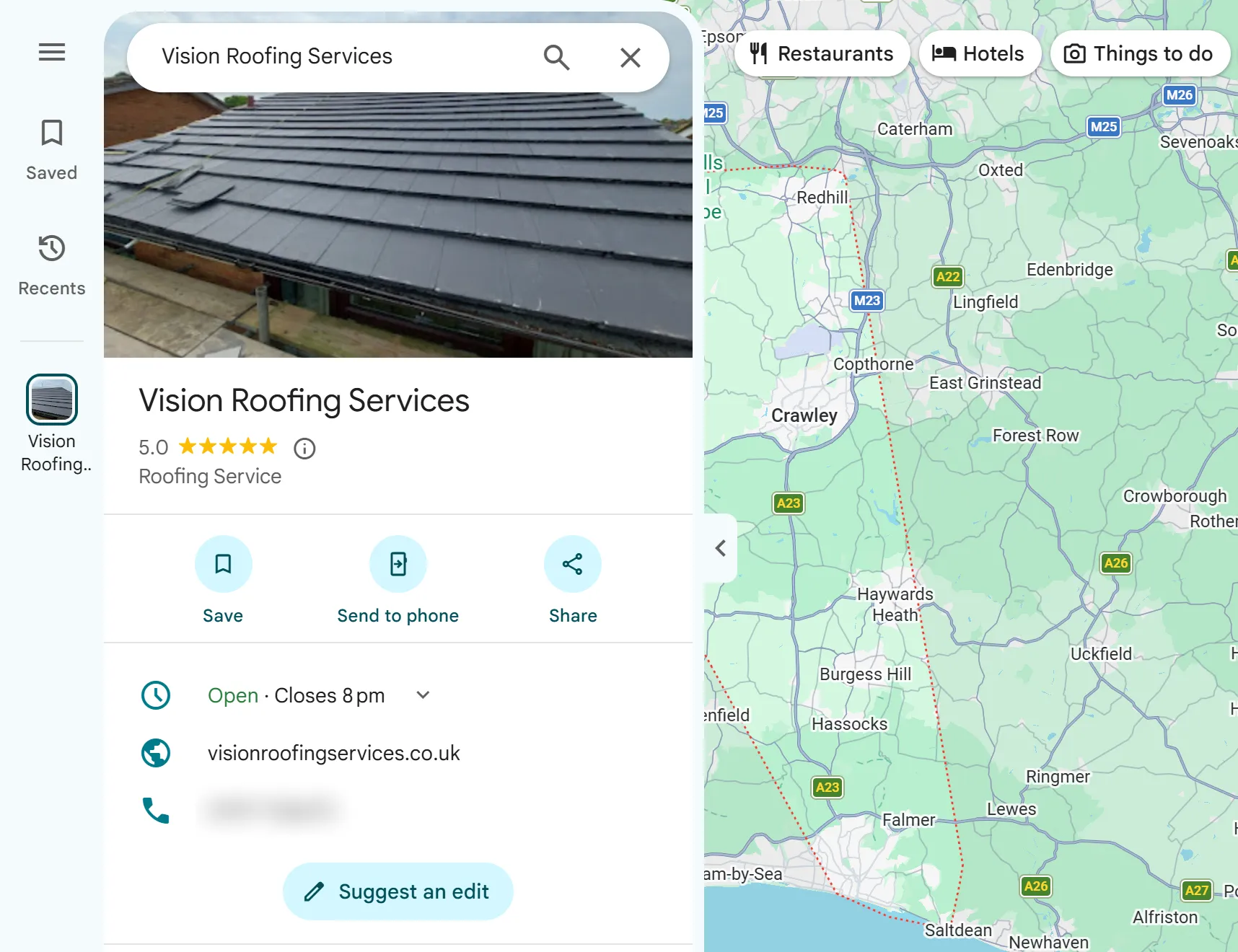
The first is Vision Roofing Services, a roofer based in Reigate. We set up and verified his profile. Everything a customer needs is in the first screen: a photo of his own roof work, his star rating, the category, his hours, his website and a phone number. There is no street address. We blurred the phone number in the capture, and changed nothing else. The red dotted line on the map is his service area, the towns he covers, instead of a pin on his house.
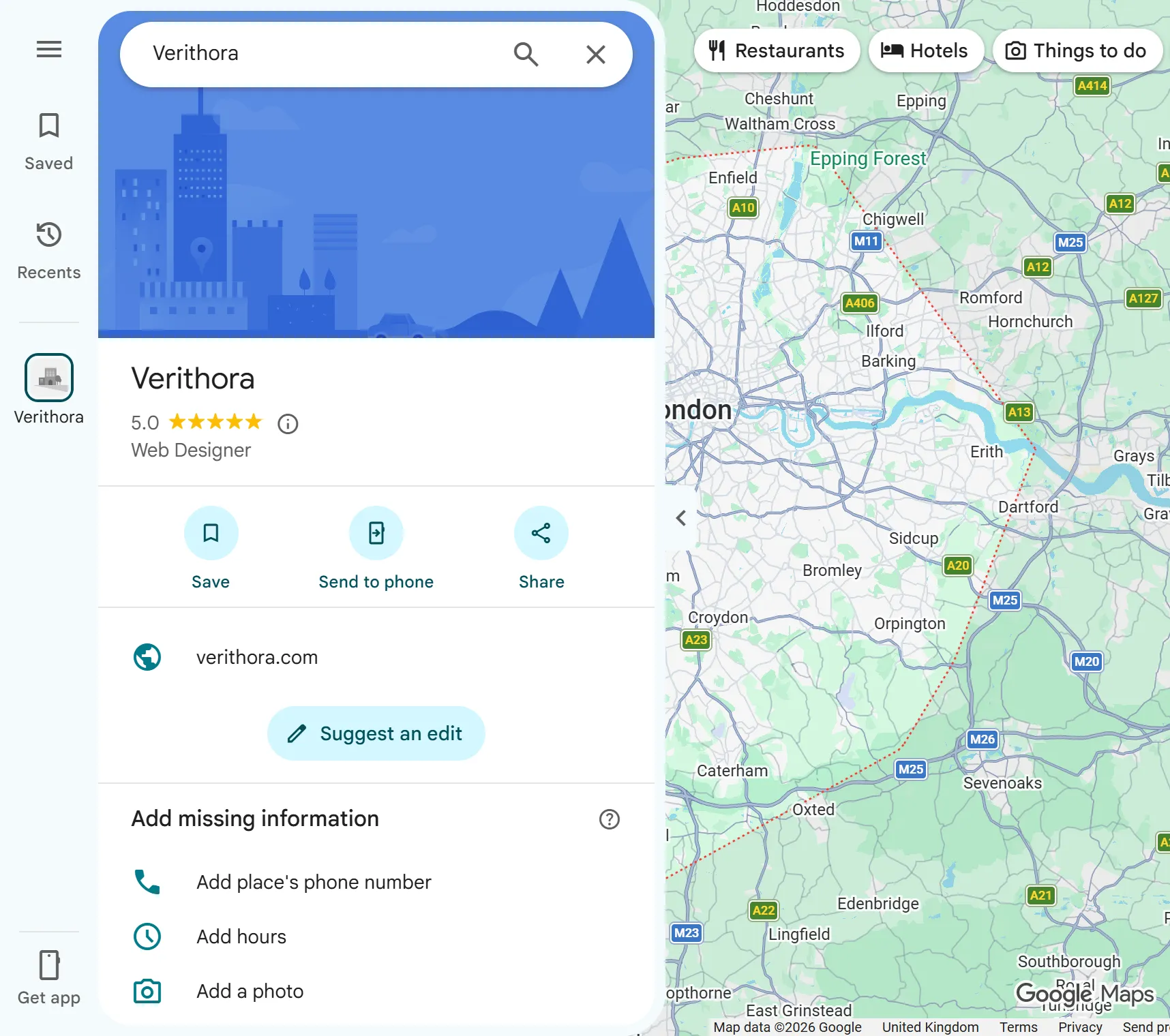
The second is ours, and it shows what customers see when a profile has gaps. It has a category and a website, and under them Google prints “Add missing information” with a phone number, hours and a photo listed. We have not filled those in yet, and we show the listing as it is rather than tidy it up for this guide. If your profile shows that box, fill in every line you can, because customers see it too.
Why is my business not showing on Google Maps?
This is the most common worry, and it is usually one of five things. Work down the list in order.
1. You are searching for the job, not your name. Search your exact business name first. If your profile comes up, you are on Google Maps. What you are really asking is why you do not come up for “fencer near me”, and that is the next section.
2. You are not verified yet. Google says verifying “tells Google that you’re authorised to represent the business, so it’s more likely to show up in search results”. Until it is done, expect to be hard to find. Sign in at business.google.com and look for a “Get verified” prompt.
3. You are too far from where you are searching. Google ranks local results partly on “how far each business is from the customer who’s searching”. Search “roofer” from your own house and you see the roofers near your house. A customer in the next town sees a different list. So check from a customer’s postcode, or ask a customer what they see.
4. The profile is half filled in. Google says “Businesses with complete and accurate info are more likely to show up in local search results”. A profile with no category beyond the first, no hours, no photos and no website has less to match a search with.
5. It has been suspended. If the profile shows as suspended or restricted when you sign in, Google has decided it breaks a rule. Do not make a new profile. Read our guide to suspended and disabled profiles and reinstatement first, because Google says an appeal can only be submitted once, with one further review possible only if it is refused.
How to rank higher on Google Maps
Google publishes the three things it looks at. Its page says “Local results are mainly based on relevance, distance and popularity”, then explains the third under the heading Prominence: “Prominence means how well-known a business is” (Improve your local ranking, checked 27 October 2026). Here is what each one means for a tradesperson, and which ones you can do anything about.
| What Google looks at | What it means | Can you change it? |
|---|
| Relevance | How well your profile matches the search | Yes. The right main category, a few extra ones, and every field filled in. |
| Distance | How far you are from the person searching | No. Nobody can, whatever they promise. |
| Prominence | How well known you are | Partly. Google names reviews and how many websites link to you. |
Reviews are the one most trades can move. Google says prominence is “based on info like how many websites link to your business and how many reviews you have”, and that “Positive reviews and helpful replies can help your business stand out”. So ask every customer the same way, the day you finish, and reply to every review, good or bad. There are rules on how you ask, and on what you may offer in return, set out in how to get Google reviews within the rules.
Your category is the quickest fix. If you are a fencer listed under a general category, changing the main category to the one that names your job is a five-minute change that affects relevance.
Give customers somewhere to check you out. A customer who finds you on Maps often wants to see your work before they ring, and a website is where they look. Google counts how many other websites link to your business. Our reading, not Google’s words, is that your own site gives those links, from suppliers, trade bodies or local groups, somewhere to point. You can see the kind of sites we build for fencers, roofers, landscapers and jet washers.
What does not work. Stuffing the town or the job into the business name breaks Google’s naming rule, and Google can suspend profiles for it. Making a second profile for the next town breaks the rule of one profile per business. And nobody can sell you a guaranteed top spot, because distance is one of the three things Google weighs and nobody can change it.
Is it worth paying anyone for this?
The setup above is free and you can do it yourself in an evening. Where trades pay is the ongoing part: asking for reviews every week, adding photos, keeping hours right, and replying to every review. If you are paying for leads instead, it is worth working out what each job costs you on Checkatrade before you decide where the money goes.
If you want it done for you, our profile management runs the profile from your own account, so it stays yours if you ever stop. We do this for trades across south London and Surrey, for example in Reigate. Every website plan includes it, and our services page lists what else the monthly fee covers.
Written by Verithora, a web studio in East Dulwich, London SE22.